STAY IN CONTACT
Messages, contacts and shared locations. Keep the conversation off the global chat.
MESSAGES + CONTACTS REBELLIONRPCOMPANION APP
THE WINDOWS COMPANION FOR REBELLIONRP
A virtual phone that sits over SCUM on your PC. Find a route, reach your contacts, handle in-game coins, and keep the music going.
Windows desktop app · No game mod required
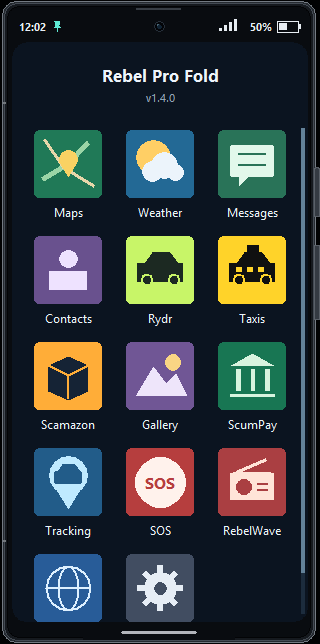
Install and run it alongside SCUM. It’s a separate desktop program.
A movable phone overlay. Use borderless windowed mode to keep it visible.
Connect your own account to the server services built into the phone.
MORE THAN A MINIMAP
One desktop companion, with the server tools you use in a phone that stays close to the action.
EXPLORE THE INTERFACE
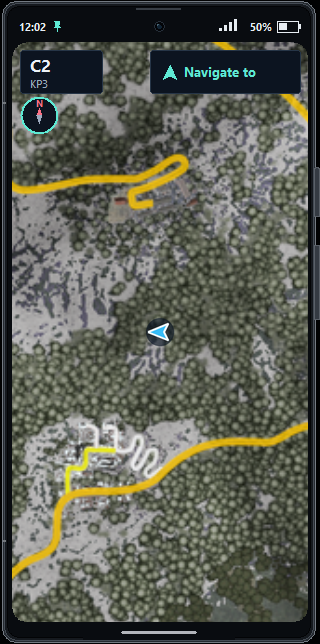
Follow your position, save custom waypoints, and get GPS directions. Unfold the phone to pan, zoom, and share a location with contacts.
Messages, contacts, in-game banking, taxis, Rydr rides, the bot shop, photos, and RebelWave—all accessible from the home screen.
See the server’s weather and in-game time, including temperature, wind and precipitation. Choose Fahrenheit or Celsius in Settings.
Interactive preview · example data, not your live account
Messages, contacts and shared locations. Keep the conversation off the global chat.
MESSAGES + CONTACTSCheck balances, make transfers and view personal or squad banking activity.
SCUMPAYFind taxi destinations or arrange a player-driven Rydr ride across the island.
TAXIS + RYDRPick a station in RebelWave. Music and the now-playing strip stay with you between apps.
REBELWAVEIT FITS THE WAY YOU PLAY
Leave the folded phone in a corner while you move. Unfold it when you need a bigger map or more room to work.
These are the default shortcuts. Change them in the app’s Settings.
GETTING STARTED
Keep SCUM in borderless windowed mode. In-game, your character needs a phone with a charged battery, switched on.
Download the Companion installer below and install it on the PC you play SCUM on.
Launch the app and enter your own RebellionRP token. Ask staff if you need help getting one.
Put it where you want it. Press F10 when you want to click, and F8 when you need more screen.
WINDOWS DESKTOP APP
Install it on your gaming PC. Run it alongside SCUM.
No mobile app. No game mod to install.
A FEW THINGS CLEARED UP
A desktop companion, built around the way RebellionRP works.
No. Install it on your Windows PC—the same computer running SCUM. The “phone” is the interface that appears over the game.
No. It’s a separate desktop program that runs alongside SCUM. It doesn’t install a game mod or change SCUM’s game files.
Like any running app, it uses CPU, memory and graphics resources. The impact depends on your PC and what you’re using, so we don’t promise zero FPS impact. You can close the Companion independently of SCUM.
The folded phone uses click-through so it doesn’t catch your mouse while you’re playing. Press F10 to enable interaction, or your custom interaction key if you changed it.
Use borderless windowed mode. Exclusive fullscreen can prevent a separate desktop overlay from appearing above the game.
That’s your character’s phone in SCUM. You need a phone in your inventory with a battery installed, charge remaining, and the phone switched on.